Login
Home
Login
Register
There was a problem loading the comments.
How to Change the Display Name of a WordPress User Account?
Support Portal
»
Knowledgebase
» Viewing Article
Print
20/06/2019 7:15 PM
WordPress
You can change the display name of your WordPress account, which shows on a WordPress post or comments without changing your WordPress username.
1.
Login to your WordPress admin dashboard.
2.
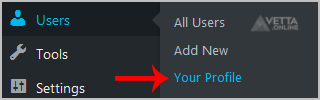
Under the dashboard menu, hover your mouse over
Users
and then click on
Your Profile
.
3.
Locate
Nickname
and enter your new name.
4
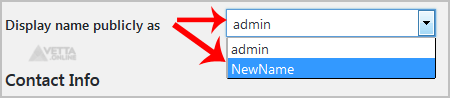
. In the option
Display name publicly as
, choose your newly added nickname from the drop-down menu.
Share via
Did you find this article useful?
Related Articles
How to Install SMF Simplemachine Forum via Softaculous in cPanel?
How to Install SMF Simplemachine Forum via Softaculous in SiteWorx?
How to install cPanel?
Categories
7
Android
4
Backup/Restore
2
Backup/Restore
4
Backup/Restore
14
Blog
16
Blog
2
CMS/Portal
43
CMS/Portal
8
Databases (DA)
4
Domain Management
8
Domain Management (DA)
6
Email (DA)
6
Email (SiteWorx)
3
FTP
4
FTP
5
FileZilla Client
13
Forum
15
Forum
7
Mail Filters & SPAM
6
Mozilla Thunderbird
3
Others (SiteWorx)
4
Security (SiteWorx)
8
SiteWorx Basic
2
Softaculous (SiteWorx)
6
SolusVM Basic
13
SolusVM VPS Management
12
WHM (For Resellers)
5
WHM (Root)
4
iOS/Apple
6
DNS - Nameservers
11
Databases
1
DirectAdmin
10
Domain Management
5
Email
4
FTP
6
Installing a Control Panel
8
Mail Filters & SPAM
3
Others
5
SSL (cPanel)
10
Security
2
Softaculous
1
WHM
17
WordPress
24
cPanel - Control Panel
© Vetta Online