Login
Home
Login
Register
There was a problem loading the comments.
How to Change Your VPS OS Root/Admin Password Using SolusVM?
Support Portal
»
Knowledgebase
» Viewing Article
Print
20/06/2019 6:51 PM
SolusVM VPS Management
You can change the root/admin password of your VPS Operating System using SolusVM.
1.
Log into your SolusVM Control Panel.
2.
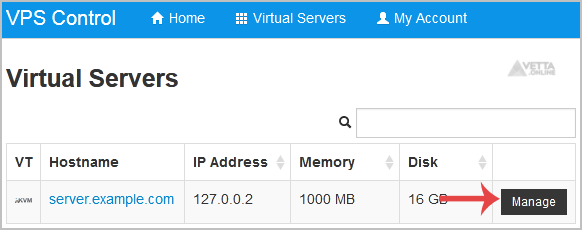
If you have multiple VPS, select the appropriate one.
3.
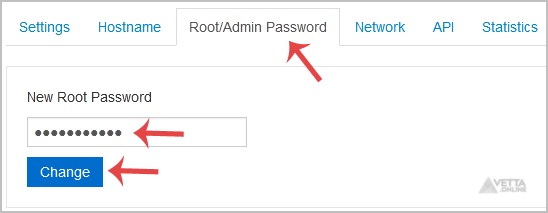
Scroll down, and under the
Root/Admin Password
tab, if it shows the password field, enter your password and click on
Change
.
4.
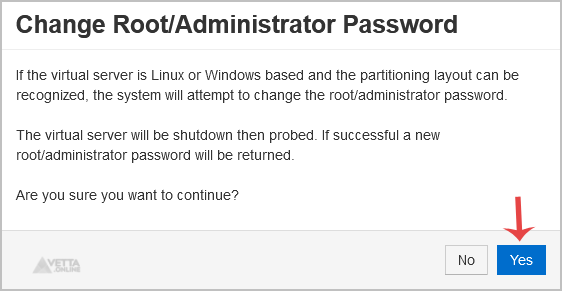
It will prompt for confirmation. Click on
Yes
.
5.
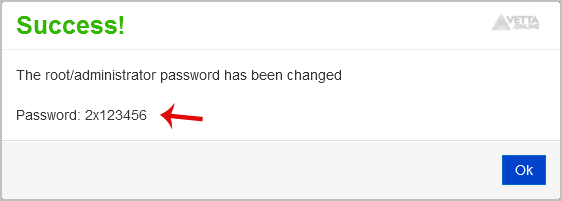
It can take some time to change the password, and then it will display it. Copy the password to Notepad.
Share via
Did you find this article useful?
Related Articles
How to Manually Install/Reinstall an OS, Using SolusVM for Customized Installation?
How to Change the Disk Driver to Virtio or IDE in SolusVM?
How to Change the Network Card to Virtio, Intel PRO, or Realtek in SolusVM?
Categories
7
Android
4
Backup/Restore
2
Backup/Restore
4
Backup/Restore
14
Blog
16
Blog
2
CMS/Portal
43
CMS/Portal
8
Databases (DA)
4
Domain Management
8
Domain Management (DA)
6
Email (DA)
6
Email (SiteWorx)
3
FTP
4
FTP
5
FileZilla Client
13
Forum
15
Forum
7
Mail Filters & SPAM
6
Mozilla Thunderbird
3
Others (SiteWorx)
4
Security (SiteWorx)
8
SiteWorx Basic
2
Softaculous (SiteWorx)
6
SolusVM Basic
13
SolusVM VPS Management
12
WHM (For Resellers)
5
WHM (Root)
4
iOS/Apple
6
DNS - Nameservers
11
Databases
1
DirectAdmin
10
Domain Management
5
Email
4
FTP
6
Installing a Control Panel
8
Mail Filters & SPAM
3
Others
5
SSL (cPanel)
10
Security
2
Softaculous
1
WHM
17
WordPress
24
cPanel - Control Panel
© Vetta Online