Login
Home
Login
Register
There was a problem loading the comments.
How to Redirect an Add-on Domain?
Support Portal
»
Knowledgebase
» Viewing Article
Print
20/06/2019 1:43 AM
Domain Management
You can redirect your add-on domain to another domain.
1.
Log into your cPanel account.
2.
In the
Domains
section, click on the
Addon Domains
icon.
3.
Under
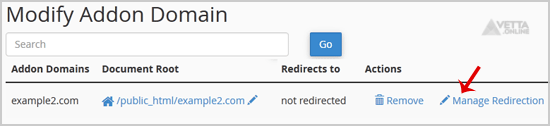
Modify Addon Domain
, locate the add-on domain and click on
Manage Redirection
.
4.
Enter the link to which you wish to redirect the add-on domain in the available text box.
5.
Click
Save
.
Share via
Did you find this article useful?
Related Articles
How to Redirect subdomain to an external URL?
How to access the WordPress admin account?
How to Install Unclassified NewsBoard via Softaculous in cPanel?
Categories
7
Android
4
Backup/Restore
2
Backup/Restore
4
Backup/Restore
14
Blog
16
Blog
2
CMS/Portal
43
CMS/Portal
8
Databases (DA)
4
Domain Management
8
Domain Management (DA)
6
Email (DA)
6
Email (SiteWorx)
3
FTP
4
FTP
5
FileZilla Client
13
Forum
15
Forum
7
Mail Filters & SPAM
6
Mozilla Thunderbird
3
Others (SiteWorx)
4
Security (SiteWorx)
8
SiteWorx Basic
2
Softaculous (SiteWorx)
6
SolusVM Basic
13
SolusVM VPS Management
12
WHM (For Resellers)
5
WHM (Root)
4
iOS/Apple
6
DNS - Nameservers
11
Databases
1
DirectAdmin
10
Domain Management
5
Email
4
FTP
6
Installing a Control Panel
8
Mail Filters & SPAM
3
Others
5
SSL (cPanel)
10
Security
2
Softaculous
1
WHM
17
WordPress
24
cPanel - Control Panel
© Vetta Online