Login
Home
Login
Register
There was a problem loading the comments.
How to reply to email in Mozilla Thunderbird?
Support Portal
»
Knowledgebase
» Viewing Article
Print
20/06/2019 1:53 AM
Mozilla Thunderbird
You can reply to emails using Mozilla Thunderbird instead of using cPanel Webmail.
1.
Open Mozilla Thunderbird.
2.
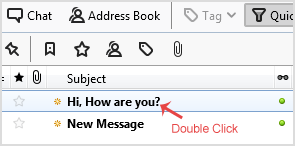
Click on the email you wish to open twice.
3.
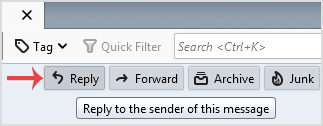
In the top-bottom area, click on the
Reply
button.
4.
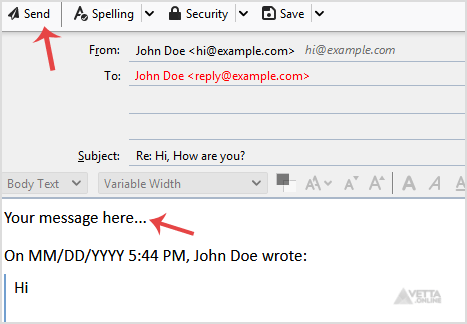
Type your message in a message box and click
Send
.
Share via
Did you find this article useful?
Related Articles
How to set a custom email signature in an Android mobile?
How to enable BoxTrapper in cPanel?
How to Change the Signature of an Apple/iOS (Sent from my iPhone)?
Categories
7
Android
4
Backup/Restore
2
Backup/Restore
4
Backup/Restore
14
Blog
16
Blog
2
CMS/Portal
43
CMS/Portal
8
Databases (DA)
4
Domain Management
8
Domain Management (DA)
6
Email (DA)
6
Email (SiteWorx)
3
FTP
4
FTP
5
FileZilla Client
13
Forum
15
Forum
7
Mail Filters & SPAM
6
Mozilla Thunderbird
3
Others (SiteWorx)
4
Security (SiteWorx)
8
SiteWorx Basic
2
Softaculous (SiteWorx)
6
SolusVM Basic
13
SolusVM VPS Management
12
WHM (For Resellers)
5
WHM (Root)
4
iOS/Apple
6
DNS - Nameservers
11
Databases
1
DirectAdmin
10
Domain Management
5
Email
4
FTP
6
Installing a Control Panel
8
Mail Filters & SPAM
3
Others
5
SSL (cPanel)
10
Security
2
Softaculous
1
WHM
17
WordPress
24
cPanel - Control Panel
© Vetta Online